A project in one conversation, and runs that say what they found
A run in the chat now says what it found first: which check needs a change, what ran, what did not, and what it rests on. Drop a DXF, IFC or STEP file on the conversation and it is read as a source, never edited.
 Nordform editorial · 4 min read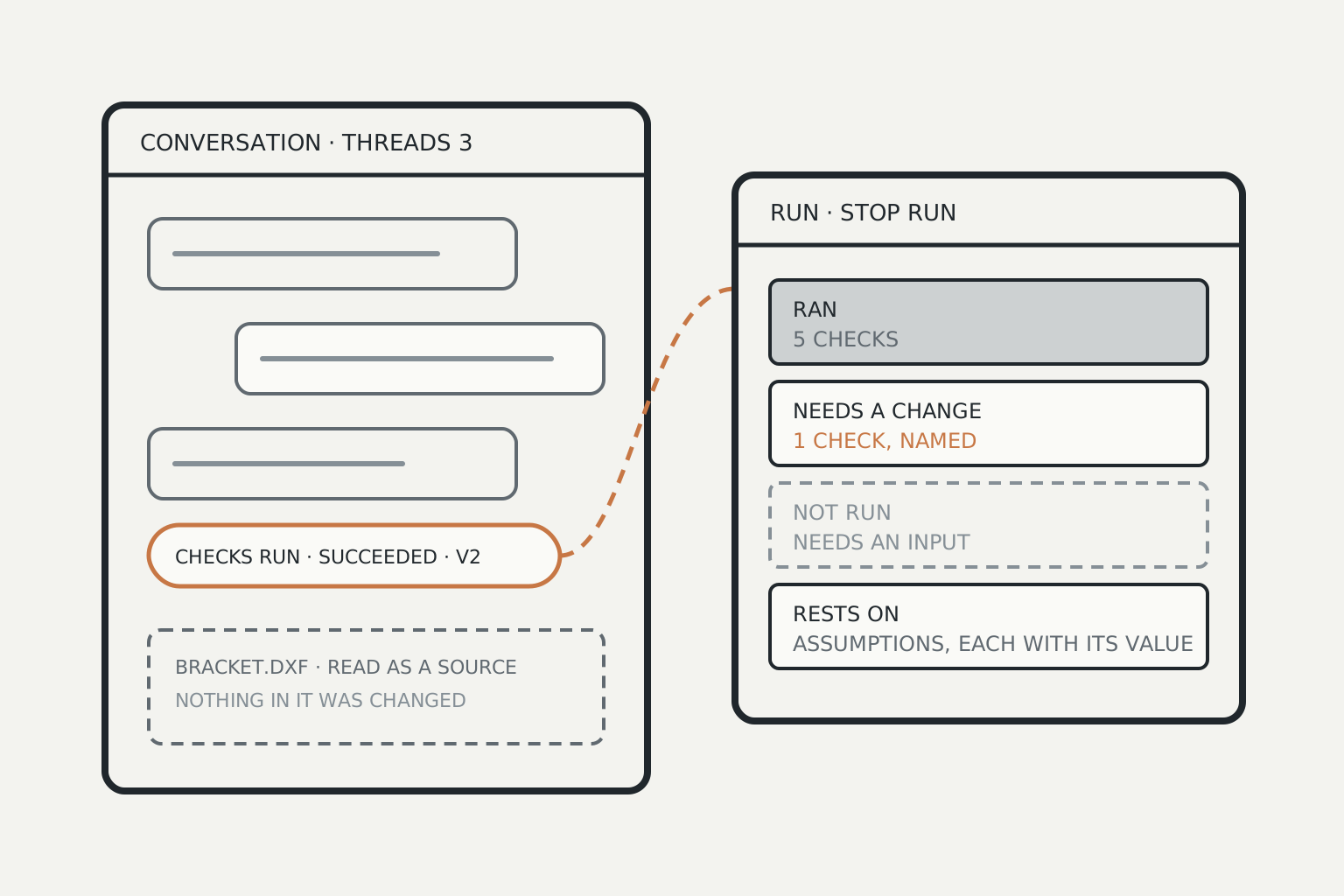
A design project tends to scatter. A question goes into one chat, a change into another, the check results arrive somewhere else, and the drawing the customer sent sits in a mail. Knowing where the design stands means reading all of it.
A project in Nordform now opens on one conversation.
One conversation, with threads
The project's conversation is where you ask. Its other chats, its orders and the customer spaces filed under it are listed beside it as threads. Each chat thread opens with a link back to the project, and filing a chat in a project makes it a thread. Nothing is moved when you do: a chat keeps the versions it made.
Above the message box, a short strip says what a run will start from: the version, the site, the country, the context packs and the decisions. An item nobody has added says so.
A run says what it found first
When a request starts a design run or a checks run, a chip appears under it with the run's state and the version it read, for example "Checks run · Succeeded · read version 2". A run that was refused says Refused.
When the run ends, its report leads with the finding in one line: the check that needs a change, by name, or, when none does, a count such as "5 of 5 checks that ran passed." Four rows follow:
- Ran: the checks that ran to a result.
- Needs a change: each check that failed, with its detail when it gave one.
- Not run: each check that did not run to a result, and why: for example it needs an input, it lies outside what its source covers, or it is only a candidate. This row is never left out.
- Rests on: the assumptions the results depend on, each with its value.
A check that can only say a rule might apply is reported as a candidate, never as a pass. The report states what ran and how it compared, and nothing beyond that.
The run beside the conversation
Pressing the chip opens the run beside the conversation. It shows what the run read (its version and context packs, with the project's site, country and decisions), its steps as they happen, its report, and Stop run. The conversation stays usable while the run goes on, and the run keeps going on the server if you close the page. In the sidebar, a chat with a run going is marked Run going.
Files read as sources
Drop a DXF, IFC or STEP file on the conversation and it is read as a source. What the reader understood is written out, with its units, into a document the conversation reads, and nothing in the file is changed. DXF and IFC are read in your browser. STEP is read on our server by the same reader that reads layouts, which holds the file for that request only. A file already stored in the project can be read the same way from its Files tool.
A DWG is read by its header only: its release and, for older releases, its section table. Its geometry, layers and text are not read, and the reading says so. From a DXF or IFC export of the same drawing, its units, extents, entities and layers are read.
A run asked for from a customer space
Someone the designer invited to their customer space as an analyst can ask for a checks run there. Nothing runs until the designer who owns the project approves it. Approval starts one checks run on the latest version of the project's conversation, and the person who asked then sees its check results. Declining starts nothing.
Scope
- A run's report screens a concept against the checks that ran. It approves nothing.
- From a DWG, only the header is read. Its drawing content reaches the conversation through a DXF or IFC export.
- A run asked for from a customer space is a checks run on the project's latest version. The person asking does not choose the version and cannot ask for a design run.
- Reports, chips and the run panel cover design runs and checks runs started in the conversation.